6
manuals
Manuals and documents
View any document right in your browser, or download the PDF.
PDF
User Manual
Most used
PDF
User Manual
PDF
User Manual
PDF
User Manual
PDF
User Manual
PDF
User Manual
Specifications
Design
ColorPink
Camera TypeSmart Compact Camera System
In The Box
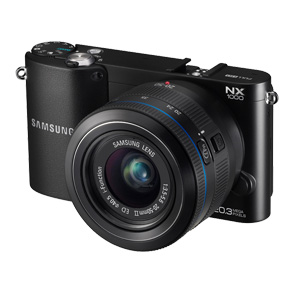
IncludedNX1000 20.3 SMART Camera (Pink)<br>20-50mm F/3.5-5.6 ED Lens (Pink)<br>16mm F/2.4 Ultra Wide Pancake Lens (Pink)<br>SEF-8A Hot Shoe Mount Flash Unit<br>BP1030 Lithium-ion Battery<br>BC1030 Battery Charger & AC Cable<br>Body Cap<br>Camera Strap<br>Micro USB Cable
Image sensor
Effective PixelApprox. 20.3 Mega-pixels
Total PixelApprox. 21.6 Mega-pixels
Image Sensor TypeCMOS
Lens
Type20-50mm F/3.5-5.6 ED Lens (Pink) EX-S2050BN <br>16mm F/2.4 Ultra Wide Pancake Lens (Pink) EX-W16N
MountSamsung NX Mount
Included LensEX-S2050BN <br> EX-W16N
Shutter Speed
Range
ModesAuto:1/4000sec. ~ 30sec.<br>Manual:1/4000sec. ~ 30sec. (1/3EV step)<br>Bulb ( Limit time : 4min. )
Exposure
ISO EquivalentAuto, 100, 200, 400, 800, 1600, 3200, 6400, 12800 (1 or 1/3EV step)<br>* AUTO ISO Upper Level is Selectable. (Up to ISO3200)
Metering SystemTTL 221(17x13) Block Segment<br>Metering : Multi, Center-weighted, Spot<br>Metering Range : EV 0-18 (ISO 100 · 30mm, F2)
Focusing
ModesSingle AF, Continuous AF, MF
Shooting
ModesSmartAuto(2.0), Program, Aperture Priority, Shutter Priority, Manual, Lens Priority, Magic, cene, Movie, Wi-Fi
RAW format shootingSRW
Display
Field of ViewApprox. 100%
Main LCD Screen3” TFT LCD
Resolution8VGA ( 640X40 ) 921k dots
Video
Movie ClipWith Audio or without Audio (User Selectable, Recording Time : 25 minutes)
Flash
ModesSmart Flash, Auto, Auto+Red-eye reduction, Fill-in, Fill-in+Red-eye reduction, 1st Curtain, 2nd Curtain, OFF
Sync. SpeedLess than 1/180 sec.
Range28mm Wide-angle (Equivalent to 35mm)
AccessorySamsung External Flash Available (SEF-42A, SEF220A : Optional)
Image Stabilization
Optical Image StabilizationOIS Mode1 / Mode2 / OFF
Smart Settings
Smart Auto2.0
Smart Filter (Movie)Vignetting, Miniature, Fish-Eye, Sketch, De-fog, Halftone Dots, Soft Focus,Old Film1, Old Film2, Negative
Smart Filter (Still Image)Miniature, Soft Focus, Old Film1, Old Film2,, Halftone Dots, Sketch, Fish-Eye, De-fog Negative
Picture Effects
Picture Wizard<b>Modes</b>:<br>Standard, Vivid, Portrait, Landscape, Forest, Retro, Cool, Calm, Classic, Custom (1~3)<br><b>Parameters:</b><br>Contrast, Sharpness, Saturation, Color
i-Function
i-Effecti-Scene (depends on Lens)<br>Smart Filter (Vignetting, Minature, Fish-Eye, Sketch, Defog, Halftone Dot)
i-Zoomx1.2, 1.4, 1.7, 2.0
Dust Reduction
Dust ReductionType: Supersonic drive
White Balance
ModesAuto, Daylight, Cloudy, Fluorescent (W, N, D), Tungsten, Flash, Custom, K(Manual)
Storage
File FormatRAW (SRW), JPEG (EXIF 2.21), DCF, DPOF 1.1, PictBridge 1.0
Image Size20.0M RAW 53<br>20.0M (3:2) : Super Fine 186, Fine 364, Normal 535<br>10.1M (3:2) : Super Fine 378, Fine 724, Normal 1043<br>5.9M (3:2) : Super Fine 626, Fine 1168, Normal 1642<br>2.0M (3:2) : Super Fine 1627, Fine 2742, Normal 3553<br>Burst (5.0M) : Super Fine 731, Fine 1349, Normal 1878<br>7.8M (16:9) : Super Fine 485, Fine 919, Normal 1310<br>4.9M (16:9) : Super Fine 747, Fine 1376, Normal 1912<br>2.1M (16:9) : Super Fine 1573, Fine 2666, Normal 3468<br>13.3M (1:1) : Super Fine 289, Fine 560, Normal 814<br>7.0M (1:1) : Super Fine 536, Fine 1010, Normal 1432<br>4.0M (1:1) : Super Fine 893, Fine 1621, Normal 2224<br>1.1M (1:1) : Super Fine 2645, Fine 4057, Normal 4936<br>
Wireless Connectivity
Wi-FiYes (IEEE 802.11n support)
Inputs & Outputs
USB 2.0USB 2.0 (HI-SPEED)
Video OutNTSC, PAL (user selectable)<br>HDMI 1.4a : (1080i, 720P, 576P / 480P)
Dimensions
Product Size (WxHxD)4.59" x 2.46" x 1.44"
Weight
Product without battery and card0.48 lb.
Power
Power SourceRechargeable Battery
BatteryBP1030 (1030mAh)
System Requirements
WindowsPC with processor better than Intel Pentium III 500MHz<br>(Intel Pentium 800MHz or higher recommended)<br>Windows XP / Vista / 7<br>Minimum 256MB RAM (512MB or more recommended)<br>250MB of available hard disk space (1GB or more recommended)<br>USB port,CD-ROM drive<br>1024x768 pixels, 16-bit color display compatible monitor (24-bit color display recommended)<br>Microsoft Direct X 9.0c or later<br><b>intelli-studio 3.0</b><br>Windows XP SP2 / Vista / 7<br>Intel Core 2 Duo 1.66 GHz or higher / AMD AthlonTM X2 Dual-Core 2.2 GHz or higher<br>Minimum 512MB RAM (1GB or more recommended)<br>250MB of available hard disk space (1GB or more recommended)<br>1024x768 pixels, 16-bit color display compatible monitor<br>(1280x1024 pixcels, 32-bit color display recommended)<br>USB 2.0, Microsoft DirectX 9.0c or later<br>nVIDIA Geforce 7600GT or higher / ATI X1600 series or higher<br># 64-bit editions of Windows XP / Vista / and 7 are not supported<br><b>Samsung RAW converter 4</b><br>Windows XP / Vista / 7<br>Intel Pentium, AMD Athlon Processor<br>(Intel Pentium 4, AMD Athlon XP or later recommended)<br>1GB or more RAM recommended<br>Minimum 100MB of available hard disk space<br>1024x768 pixels, Full Color (24-bit or higher) color display compatible monitor
MacintoshPower Mac G3 or later<br>Mac OS 10.4 or later <br>Minimum 256MB RAM (512MB or more recommended)<br>Minimum 110MB of available hard-disk space<br>USB port,CD-ROM drive<br><b>Samsung RAW converter 4</b><br>Mac OS X v10.6 / v10.5 / v10.4<br>Power PC / Intel Processor-based or compatible computer (Core 2 Quad or later recommended)<br>1GB or more RAM recommended<br>Minimum 100MB of available hard disk space<br>1024x768 pixels, 24-bit color display compatible monitor
Operating Conditions
Humidity5 ~ 85%
Temperature0 ~ 40 °C
Software
Included in BoxSamsung Raw Converter Software / Samsung i-Launcher Software w/ CD User Manual
About this product
This page collects every official document Samsung publishes for the NX1000 (EV-NX1000BLPUS) — so you can install, troubleshoot, or check warranty terms without hunting through a drawer.