3
manuals
Manuals and documents
View any document right in your browser, or download the PDF.
PDF
User Manual
Most used
PDF
User Manual
PDF
User Manual
Specifications
Design
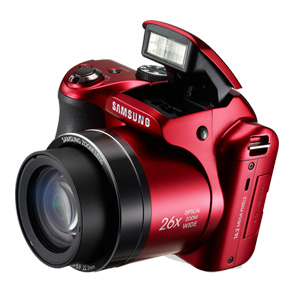
ColorRed
Image sensor
Effective PixelApprox 16.2 MP
Total PixelApprox 16.4 MP
Image Sensor TypeCCD
Lens
Optical Zoom26X
Digital ZoomStill Image Mode : 1.0X ~ 26.0X(Optical) <br>/ 1.0X~5.0X(Digital)<br> Intelli-Zoom : 2.0X <br> Play Mode : 1.0X ~ 14.4X (Depends on Image Size)
Focal Length4 mm (Equivalent to 22.3 mm in 35mm format)
F No.3.1 (W) ~5.9 (T)
Shutter Speed
ModesSmart Auto : 1/8 ~ 1/2,000 sec., Program: 1 ~ 1/2,000 sec., Night : 8 ~ 1/2,000 sec.
Exposure
Compensation±2EV (1/3EV steps)
ControlProgram AE
ISO EquivalentAuto, 80, 100, 200, 400, 800, 1600, 3200(3M)
Metering SystemMulti, Spot, Center-Weighted, Face Detection AE
Focusing
Modes
RangeNormal : 80 cm ~ Infinity (Wide), 350 cm ~ Infinity (Tele)<br>Normal: 80 cm ~ Infinity (Wide), 350 cm ~ Infinity (Tele)<br>Macro: 10 cm ~ 80 cm (Wide), 200 cm ~ 350 cm (Tele)<br>Auto Macro: 10 cm ~ Infinity (Wide), 200cm ~ Infinity (Tele)<br>Super Macro: 1 cm~10 cm (Only z09)
Display
Main LCD Screen3.0” TFT LCD
Flash
ModesAuto, 80, 100, 200, 400, 800, 1600, 3200(3M)
RangeWide: 80 cm ~ 6 m (ISO Auto), Tele : 2 m ~ 4 m (ISO Auto)
Image Stabilization
Dual Image StabilizationYes
Smart Settings
Smart AutoYes
Smart AlbumYes
White Balance
ModesAuto WB, Daylight, Cloudy, Fluorescent_H, Fluorescent_L, Tungsten, Custom
Storage
File Format* Still Image : JPEG (DCF), EXIF 2.21, DPOF 1.1<br>* Movie Clip : MP4 (Video: MPEG4, AVC/H.264, Audio: AAC)
Image Size16M: 4608×3456, 14 MP : 4608×3072<br>12M W: 4608×2592, 10M: 3648×2736 8M (1:1): 2832×2832<br>5M: 2592×1944, 3M: 1984×1488<br>2MW: 1920×1080, 1M: 1024×768
Still Image
Shooting * Mode (Dial): 1) Smart Auto, 2) Program, 3) Scene, 4) Dual IS, 5) Live Panorama, 6) Magic, 7) Set, 8) Movie<br>* Scene: Beauty Shot, Frame Guide, Night, Portrait, Children, Landscape, Close-up, Text, Sunset, Dawn, Backlight, Firework, Beach & Snow<br>* Magic: 3D Photo, Live Panorama, Magic Frame, Split Shot, Picture in Picture (Still), Photo Filter, Movie Filter, Photo Editor<br>* Smart Auto: Portrait, Night Portrait, Night, Backlight Portrait, Backlight, Landscape, White, Macro, Macro Text, Tripod, Action, Macro Color, Natural Green, Blue Sky, Sunset<br>* Drive: Single, Continuous, AEB, Motion Capture<br>* Self Timer: Off, 2 sec., 10 sec., Double (10 sec., 2 sec.)
Image Playback
OptionsSingle Image, Thumbnails, Advanced Slide Show, Movie Clip, Smart Album
Audio
MicrophoneMono
SpeakerMono
Inputs & Outputs
USB 2.0Yes
Video OutAV, HDMI 1.4 : NTSC / PAL (User Selectable)
Dimensions
Product Size (WxHxD)4.51" x 3.12" x 3.4"
Weight
Product without battery and card0.9 lb.
Power
Power SourceConnector Type: Micro USB (5 Pin)
BatteryRechargeable Battery : 4×AA Type
System Requirements
WindowsIntel® Pentium®4 3.2 GHz or Above / AMD Athlon™ FX 2.6 GHz or Above<br>Windows XP_SP2 / Vista / 7<br>250MB or More Hard-Disk Capacity (Over 1GB Recommended)<br>512MB RAM (Over 1GB Recommended)<br>nVIDIA Geforce 7600GT or Above / ATI X1600 Series or Above<br>1024×768 pixels, 16-bit Color Display Compatible Monitor<br>(1280×1024 Pixels, 32-bit Color Display Recommended)<br>CD-ROM Driver<br>USB Port<br>DirectX 9.0c or Above
MacintoshPower Mac G3 or Above<br>Mac OS 10.4 or Above<br>110MB or More Hard-Disk Capacity<br>Minimum 256MB RAM<br>CD-ROM Driver<br>USB Port
Operating Conditions
Humidity5 - 85 %
Temperature0 ~ 40 °C
Software
Included in BoxiLinker Inside (Intelli-Studio)
About this product
This page collects every official document Samsung publishes for the 16.2 Megapixel Samsung Digital Camera (EC-WB100) (EC-WB100ZBARUS) — so you can install, troubleshoot, or check warranty terms without hunting through a drawer.